Git
Jump to Section
- Git 원격(remote)으로 관리하기
Git은 소스코드를 효과적으로 관리하기 위해 개발된 ‘분산형 버전 관리 시스템’이다. 우리는 이 Git을 이용기위해 가장먼저 Github 홈페이지에서 저장소(repository)를 만들고, 이를 로컬에서 원격으로 관리한다.
본 포스팅에서는 Git의 설치와 repository 가 github에 생성이 완료되었다는 가정하에, git 저장소(repository)를 로컬에서 원격으로 관리하고 그 서브모듈(submodule) 까지 관리하는 것을 설명한다.
1. Git remote 설정
- origin 으로 설정할 directory 및 repository를 선정. ( repository 없을 경우 github 에서 생성할 것.)
- origin 하위에 생성할 submodule의 directory 및 repository를 선정.
- origin directory로 이동하며 아래와 같은 명령어를 실행한다.
- submodule 이란?
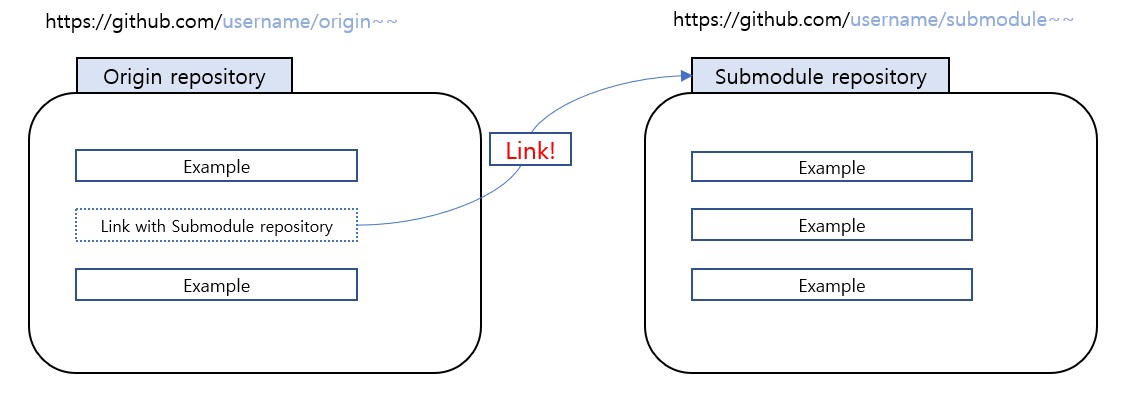 submodule 이란 origin repo에서 다른 repo를 하위 모듈로 갖을 때 지정하는 방식이다.
git은 기본적으로 repo 밑에 repo, 즉 하위 repo를 두지 못한다. (origin은 반드시 하나이다.)
submodule 은 이를 가능하게 하기위해, 먼저 origin repo를 지정하고 이후에 submodule 명령어로 하위 repo를 지정하는 방식이다.
그 방법은 아래와 같다.
submodule 이란 origin repo에서 다른 repo를 하위 모듈로 갖을 때 지정하는 방식이다.
git은 기본적으로 repo 밑에 repo, 즉 하위 repo를 두지 못한다. (origin은 반드시 하나이다.)
submodule 은 이를 가능하게 하기위해, 먼저 origin repo를 지정하고 이후에 submodule 명령어로 하위 repo를 지정하는 방식이다.
그 방법은 아래와 같다.
# origin directory로 이동
cd [origin 디렉토리]

# git 초기화
git init

# origin repo url로 연결. url은 github에 생성한 repo에서 복사 가능
git remote add orgin [orign repo url]

# submodule 추가 명령어.
git submodule add -b master [sub repo url] [sub directory]

# 수정한 파일들 추가
git add .

# 위에서 add 로 추가한 내용, 메시지와 함께 commit
git commit -m "example message"

# commit 한 내용 push. master는 branch 이름
git push origin master
추가 참고사항
서브 디렉토리는 submodule 명령어 입력하면 자동으로 생긴다.
git remote 설정 시 orign이 이미 있다고 에러가 날때, 아래 명령어로 기존의 origin을 제거한다.
git remote rm origin
submodule 제거 방법
# submodule 을 origin에서 제거
git submodule deinit -f example-submodule-directory

# local git module 제거
rm -rf .git/modules/example-submodule-directory

# local 에서 제거
git rm -f example-submodule-directory
2. Git clone
다양한 git 소스들을 가져다 쓸때, 보통 git clone이라는 명령어를 이용해 가져온다.
git clone [target repo url]